


 Detailed Description of the current Version
 Data Sheets of all Database Tables Database Examples Prices of the Geodata Germany
 Download
Place order
Download
Place order
 History of Modifications and Supplements
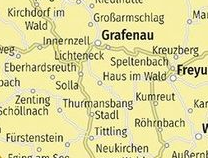
Already since 1991 KilletSoft provides geodata of the Federal Republic of Germany with georeferenced towns, municipalities, urban districts and other administrative units, postal codes and dialling codes. Each data record is georeferenced using Lon/Lat, UTM and Gauss-Krueger coordinates with ETRS89 and DHDN datum, so the data can easily be displayed on a map or imported into any GIS using provided KML, GPX and Shape files standard geographic formats. Starting in 2005, the database were supplemented by natural areas, landscapes, climatic and touristic information, which can be linked by index to the database tables mentioned above. The data are provided with a consistent structure in established CSV and GIS formats that are easy to import into any software and database management system. Geodata Germany are provided in highest accuracy and topicality and they are subject to continuous quality control.
The locality database contains geodata of Germany with tables of georeferenced towns, municipalities, urban districts and other administrative units, postal codes, dialling codes and nature areas, landscapes and climatic information and also registers of the official topographical cartographies. The database tables contain coordinates and elevation data for navigation and geocoding, perimeter searches and distance calculations, and are suitable for the spatial allocation of ecological and economical information. The information is stored in several database tables that can be linked together by the official municipality key.
More examples for the usage of the database tables The Town and Municipality Database ORTREF with georeferences and elevations The Town and Municipality Database ORTGEM without georeferences and elevations The Town Quarter Database ORTTLREF with georeference and elevationss The Town Quarter Database ORTTLGEM without georeferences and elevations The Postal Code Database PLZREF with georeferences and elevations The Postal Code Database PLZGEM without georeferences and elevations The dialling code Database VORWREF with georeferences and elevations The dialling code Database VORWGEM without georeferences and elevations The Administrative County Database KREIS The Administrative District Database REGBEZ The Federal States of Germany Database LAND The Landscapes Database LANDSCH The Database with Nature Area Classification NATRAUM The Database with Snow and Wind Load Zones LASTEN he database with solar irradiations and weather data SOLAR The Database with Travel Areas and Urban Specificities REISEGEB The Database with Map Data in 1:25000 scale (TK25) The Database with Map Data in 1:50000 scale (TK50) The Database with Map Data in 1:100000 scale (TK100) The Database with Map Data in 1:200000 scale (TKÜ200) Quality of the Geodata Use of the coordinates contained in the Geodata tables Uniqueness by record ID - Simplified update Conversion to the necessary data format Combination of the towns and urban districts to a common database Acquisition of a license and right of use of the Geodata tables Pricing and ordering Note to the download of the test data and the data converterQuite often it is necessary to reference an address field e.g. like town or municipality name, postal code or dialling code, to corresponding geographical data and coordinates - a georeference. The georeference can be used for example to direct a customer to the closest store locations of a retail store chain by doing a proximity search. Or on the basis of the determined georeferences statistics or general maps can be made. Another possibility it to determine distances between the different objects of the database tables with the georeferences contained therein. The georeferences are available as UTM coordinates, Gauss-Krueger-Coordinates, Geographical Coordinates and as Plus Codes in degree and deg/min/sec notation. With the elevation data from a Digital Elevation Model the ground level height of each place can be determined. Often the knowledge is necessary about affiliations and relationships between data derived from different hierarchies. So it can be determined to which Federal State, governmental area or governmental county a town, a postal code or a dialling code is assigned. Or it can be determined on which topographic map a town or urban district is mapped or in which Federal State a certain town is to find.
It is possible to assign a variety of natural, scenic, climatic and touristic information to each town or municipality. Snow and wind load zones and solar irradiations are available as local climatic data. In conjunction with the ground level heights the snow and wind load zones can be used to calculate static loads for the planning of building constructions. The solar irradiation data can be used to schedule thermal and photovoltaic solar power systems.
The data base also contains registers of the official topographical cartographies TK25, TK50, TK100 and TKÜ200 of the Federal Republic of Germany. Map names and map numbers, corner coordinates and supplemental data of the official topographical maps are included in the registers.
Geographical coordinates in degree notation are particularly well suitable for map views and researches with Google Earth, Google Maps and OpenStreetMap.
As an example here an Internet URL is presented using the free Google API with the coordinate of KilletSoft's hometown Kempen for displaying a map on Google Maps.
The first value behind the identifier ";query" is the geographical latitude, then the geographical longitude follows.
The shown source below can be inserted directly into an anchor tag to present the map.
https://www.google.com/maps/search/
?api=1
&query=51.36430,06.41962
These possibilities are provided by the database tables which are maintained by KilletSoft.
In the following text only a brief description of the data is provided.
Detailed data descriptions of all database tables you find in the Data Sheets.
A selection of test data you find in the download file.
The Town and Municipality database ORTREF contains more then 11.000 data records with georeferenced local data of all autonomous towns, county dependent towns and municipalities of the Federal Republic of Germany.
Detailed information, combination possibilities with other data base tables, hints to the use of the georeferences and the formulas for distance computation you will find in the download file or in the Data Sheet.
These data fields are contained in the database table:
The Town and Municipality database ORTGEM contains the same data as the database table ORTREF, but without georeferences.
The lower-priced table is suitable for all applications, which do not need georeferences.
Detailed information and combination possibilities with other data base tables you will find in the download file or in the Data Sheet.
These data fields are contained in the database table:
The Town Quarters database ORTTLREF contains approx. 116.000 data records with georeferenced local data of urban districts and town parts, which belong to the towns and municipalities contained in the database ORTREF.
Detailed information, combination possibilities with other database tables, hints to the use of the georeferences and the formulas for distance computation you will find in the download file or in the Data Sheet.
These data fields are contained in the database table:
The Town Quarter database ORTTLGEM contains the same data as the database table ORTTLREF, but without georeferences.
The lower-priced table is suitable for all applications, which do not need georeferences.
Detailed information and combination possibilities with other data base tables you will find in the download file or in the Data Sheet.
These data fields are contained in the database table:
The Postal Code database PLZREF contains more then 30.000 data records with georeferenced postal codes of the delivery areas and the post box offices as well as the municipality keys of the suitable towns.
Detailed information, combination possibilities with other database tables, hints to the use of the georeferences, hints for the geocoding of postal addresses and the formulas for distance computation you will find in the download file or in the Data Sheet.
These data fields are contained in the database table:
The Postal Code database PLZGEM contains the same data as the database table PLZREF, but without georeferences.
The lower-priced table is suitable for all applications, which do not need georeferences.
Detailed information and combination possibilities with other data base tables you will find in the download file or in the Data Sheet.
These data fields are contained in the database table:
The Telephone dialling code database VORWREF contains more then 19.000 data records with georeferenced dialling codes as well as the municipality keys of the suitable towns.
Detailed information, combination possibilities with other database tables, hints to the use of the georeferences, hints for the geocoding of telephone numbers and the formulas for distance computation you will find in the download file or in the Data Sheet.
These data fields are contained in the database table:
The Telephone dialling code database VORWGEM contains the same data as the database table VORWREF, but without georeferences.
The lower-priced table is suitable for all applications, which do not need georeferences.
Detailed information and combination possibilities with other data base tables you will find in the download file or in the Data Sheet.
These data fields are contained in the database table:
The Administrative County database KREIS contains the names and Administrative County Keys of approx. 400 counties of the Federal Republic of Germany and county-referred data.
The data can be linked by the Administrative County Key with the contents of the other database tables by using their Municipality Keys.
Detailed information and combination possibilities with other data base tables you will find in the download file or in the Data Sheet.
These data fields are contained in the database table:
The Administrative District database REGBEZ contains the names and Administrative District Keys of all districts of the Federal Republic of Germany.
The data can be linked by the Administrative District Key with the contents of the other database tables by using their Municipality Keys.
Detailed information and combination possibilities with other data base tables you will find in the download file or in the Data Sheet.
These data fields are contained in the database table:
The Federal States of Germany database LAND contains the names and Federal State Keys of all states of the Federal Republic of Germany.
The data can be linked by the Federal State Key with the contents of the other database tables by using their Municipality Keys.
Detailed information and combination possibilities with other data base tables you will find in the download file or in the Data Sheet.
These data fields are contained in the database table:
The database table contains the landscapes with the different landscape types of the Federal Republic of Germany.
With the landscape-key the data can be connected to the contents of other database tables.
Detailed information and combination possibilities with other data base tables you will find in the download file or in the Data Sheet.
These data fields are contained in the database table:
The database table contains the natural area classification of the Federal Republic of Germany in the form of hierarchically structured natural area units.
With the nature-area-unit-key the data can be connected to the contents of other database tables.
Detailed information and combination possibilities with other data base tables you will find in the download file or in the Data Sheet.
These data fields are contained in the database table:
The database table contains the snow load and wind load zones and the solar irradiation for the areas of the cities and municipalities of the Federal Republic of Germany. In conjunction with the ground level heights contained in the database table the load zones can be used to calculate static loads for building constructions. These data fields are contained in the database table:
The database table contains the solar irradiations and some weather data for the areas of the cities and municipalities of the Federal Republic of Germany. The solar irradiation data can be used to schedule thermal and photovoltaic solar power systems. These data fields are contained in the database table:
The database table contains the travel areas of the Federal Republic of Germany. As travel areas not administrative spatial units are designated, which are based mainly on the responsibility areas of the regional tourism organizations and on natural spatial conditions. These data fields are contained in the database table:
The map register TK25 contains map numbers, map names, corner coordinates and additional information of the official topographic cartography TK25 (ordnance) with a scale 1:25000 of the Federal Republic of Germany.
Detailed information, combination possibilities with other database tables and hints to the use of the georeferences you will find in the download file or in the Data Sheet.
These data fields are contained in the database table:
The map register TK25 contains map numbers, map names and additional information of the official topographic cartography TK50 with a scale 1:50000 of the Federal Republic of Germany.
Detailed information, combination possibilities with other database tables and hints to the use of the georeferences you will find in the download file or in the Data Sheet.
These data fields are contained in the database table:
The map register TK100 contains map numbers, map names and additional information of the official topographic cartography TK100 with a scale 1:100000 of the Federal Republic of Germany.
Detailed information, combination possibilities with other database tables and hints to the use of the georeferences you will find in the download file or in the Data Sheet.
These data fields are contained in the database table:
The map register TK200 contains map numbers, map names and additional information of the official topographic cartography TKÜ200 with a scale 1:200000 of the Federal Republic of Germany.
Detailed information, combination possibilities with other database tables and hints to the use of the georeferences you will find in the download file or in the Data Sheet.
These data fields are contained in the database table:
The geodata offered here are in high-precision quality and are present in different Coordinate and Reference Systems. They are constantly updated and they are subject of a constant quality control. Nevertheless, it is possible that with such large amounts of data deviations of the data contents from reality can occur to a small extent. We have to emphasize expressly that deviations or errors of less than one percent of the data volume of a database cannot be faulted. Should you even notice such deviations, we will endeavor to correct them promptly.
The coordinates are present as geographic coordinates, as Gauss-Krueger coordinates of the 3rd meridian strip and as UTM coordinates on the 32th meridian strip. Because UTM coordinates and Gauss-Krueger coordinates are converted to a uniform meridian strip, distances between two points can be calculated by the simple execution of the Pythagoras theorem. That has the advantage in relation to the computation with geographical coordinates (see below) that it is substantially simpler and much faster. The result is the distance between the points in meters.
Formula for the distance calculation with Gauss-Krueger coordinates:
difEast   = abs(GKRECHTS1 - GKRECHTS2)
difNorth  = abs(GKHOCH1 - GKHOCH2)
l         = sqrt(difEast * difEast + difNorth * difNorth)
with
GKRECHTS1:  Easting of the first coordinate
GKHOCH1:    Northing of the first coordinate
GKRECHTS2:  Easting of the second coordinate
GKHOCH2:    Northing of the second coordinate
abs():      Absolute value function
sqrt():     Square root function
l:          Distance in meters as result.

Formula for the distance calculation with UTM coordinates:
difEast   = abs(UTMRECHTS1 - UTMRECHTS2)
difNorth  = abs(UTMHOCH1 - UTMHOCH2)
l         = sqrt(difEast * difEast + difNorth * difNorth)
with
UTMRECHTS1: Easting of the first coordinate
UTMHOCH1:   Northing of the first coordinate
UTMRECHTS2: Easting of the second coordinate
UTMHOCH2:   Northing of the second coordinate
abs():      Absolute value function
sqrt():     Square root function
l:          Distance in meters as result.
Geographic coordinates are indicated in longitude and latitude. Usually longitude and latitude are represented in the degree notation, which is also called decimal notation. Geographical coordinates in the degree notation are for the distance computation better suitable than geographical coordinates in the degrees/minutes/second notation. For a distance computation the longitude and latitude of the first point (LAENGE_D1, BREITE_D1) and the longitude and latitude of the second point (LAENGE_D2, BREITE_D2) are needed. If the latitude has a minus sign, the point is on the southern earth hemisphere, otherwise on the northern earth hemisphere. If a longitude has a minus sign, the point is situated west of the Greenwich meridian, otherwise east of it. In the Federal Republic of Germany no minus signs occur, because all coordinates are on the northern earth hemisphere and east of Greenwich.
As preparation for the distance computation the longitude and latitude are
converted into radians. The unit of the radian is [rad].
Lon1r     = LAENGE_D1 * PI / 180
Lat1r     = BREITE_D1 * PI / 180
Lon1r     = LAENGE_D2 * PI / 180
Lat1r     = BREITE_D2 * PI / 180
  with
LAENGE_D1:  Longitude of the first point in degree notation
BREITE_D1:  Latitude of the first point in degree notation
LAENGE_D2:  Longitude of the second point in degree notation
BREITE_D2:  Latitude of the second point in degree notation
Lon1r:      Radian of the longitude of the first point
Lat1r:      Radian of the latitude of the first point
Lon1r:      Radian of the longitude of the second point
Lat1r:      Radian of the latitude of the second point
PI:         Circle constant Pi

Now the longitudes and latitudes of the two coordinates are so far prepared
that they can be inserted into the formula for the distance computation.
l        =  r * acos[sin(Lat1r) * sin(Lat2r)
            + cos(Lat1r) * cos(Lat2r) * cos(Lon2r - Lon1r)]
with
sin():      Sinus function
cos():      Cosinus function
acos():     Arcus Cosinus function
r:          Earth equatorial radius = 6378137 meter
l:          Distance in meters as result
The conversion of the geographic, Gauss-Krueger and UTM coordinates into another coordinate and/or Reference System, can be accomplished with the Coordinate Transformation program TRANSDATpro or as purchase order.
Like that it is possible to convert e.g. into the Lambert Coordinate System or to Soldner coordinates and into the usual Reference Systems.
Wir haben für jeden Datensatz in den Orts-Datenbanken ORTGEM / ORTREF und in den Ortsteil-Datenbanken ORTTLGEM / ORTTLREF eindeutige Datensatz-IDs generiert. Das hat den Vorteil, dass aktualisierte Daten bei einem Update ohne großen Aufwand in den eigenen Datenbestand eingepflegt werden können. Eine Datensatz-ID ist eindeutig (unique) und bleibt auch bei Änderung der Ortsbezeichnung oder Ortsteilbezeichnung oder nach Änderung sonstiger Datenfelder während der ganzen Lebensdauer des Datensatzes erhalten.
Führen Sie beim erstmaligen Einpflegen von KilletSoft-Daten die eindeutigen Datensatz-IDs in Ihren eigenen Datenbeständen mit. Beim späteren Einpflegen eines Updates überführen Sie die aktualisierten KilletSoft-Datenfelder ganz einfach anhand der eindeutigen Datensatz-IDs und des im Datensatz enthaltenen Änderungdatums in Ihren eigenen Datenbestand. Überlegen Sie sich eine Strategie für neu hinzugekommene oder ungültig gewordene Datensätze, die Sie durch fehlende oder neue Datensatz-IDs im Update lokalisieren können.
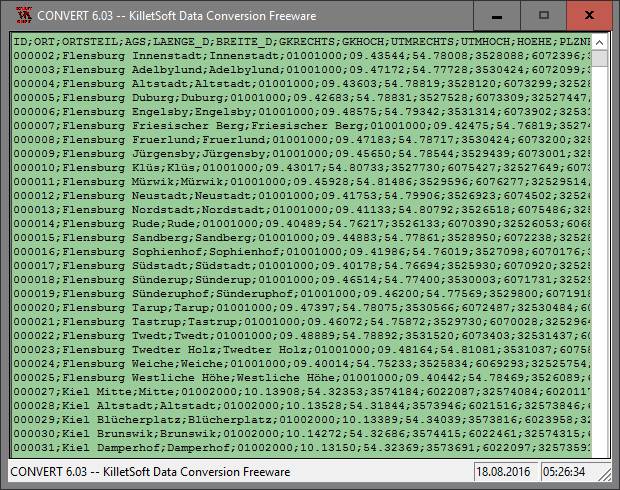
As a standard the database tables are present in the file format CSV (Comma Separated Values). The used character set is ANSI. This format is used often and in most cases you can import the data directly into your own system. For example, you can process the data directly in MS-ACCESS or MS-EXCEL without further editing.
The downloadable freeware program CONVERT converts the available database tables into other data formats and character sets with the necessary sortings and selections.
With the program for example CSV data can be converted into the SDF format (Simple Document Format) or into the dBase format.
For the use of the data on different platforms it is possible to select between the character sets ASCII, ANSI, UTF8 and UniCode.
Thus the import of the data in any database management system or file system will be possible.
For the import in MySQL or SQL databases the necessary "CREATE TABLE" script can be generated. Further the selection of the data on data fields and data records is possible. In addition the data can be sorted on base of the data fields. Data from several files can be joined to a common file.
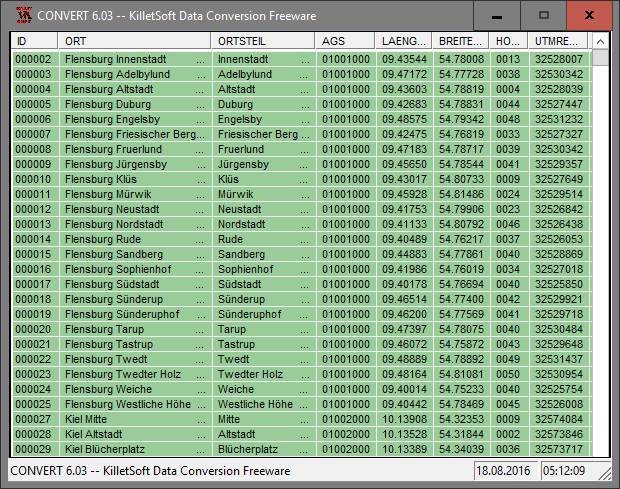
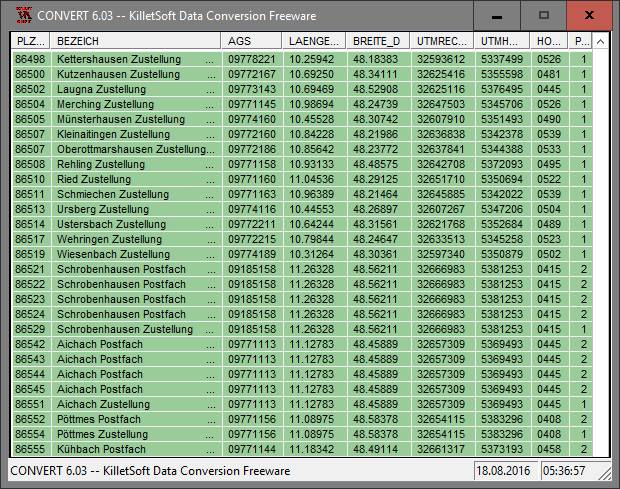
Here you can have a look to some screenshots of the converter program.
If both database tables ORTREF and ORTTLREF or ORTGEM and ORTTLGEM were acquired, they can be joined to a common database table and sorted again by assistance of the freeware program CONVERT (download see below). In the database table then all towns / municipalities and urban districts are arranged among each other and sorted on the municipality key.
The license models described here require only a unique payment.
No additional payments are raised as a function of the number of installations or on the service life of the license.
The service life is unlimited.
The data of the presented database tables can be used by computer programs and Internet sites (applications) and made available to customers within the scope of the application. The database tables are licensed for different types of use:
Pricing and ordering information for the database tables presented here and for other software products can be found in the Price list.
Order the "Geodata Germany" with the electronic Order Form.
A selection of test data of all database tables presented here with the detailed data description and with information about the use of the data can be downloaded as ZIP packed file by the Internet.
The Freeware program CONVERT, developed by KilletSoft, for converting and adaptation of the data is ready for download if necessary.
 In order that you are always well informed about our company, we write actual news, current information and special offers here into this column.
 Geodata Germany
 Read more...
New work sheet
Read the work sheet...
New work sheet
Read the work sheet...
New work sheet
Read the work sheet...
NTv2 collection
Read the Press Release... To the NTv2 collection...
is member of
Read more...
New work sheet
Read the work sheet...
New work sheet
Read the work sheet...
New work sheet
Read the work sheet...
NTv2 collection
Read the Press Release... To the NTv2 collection...
is member of
 Translators wanted!
new languages can be added at any time by creating new language files.
Everybody who is interested can translate a new language file into his native language for himself and all users.
Translators wanted!
new languages can be added at any time by creating new language files.
Everybody who is interested can translate a new language file into his native language for himself and all users.
