


 Detailed Description of the current Version
 User Interface Details Prices TOPOWIN
 Download
Place order
Download
Place order
 History of Modifications and Supplements
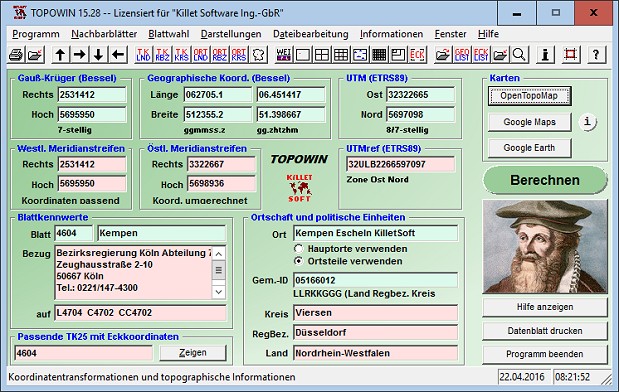
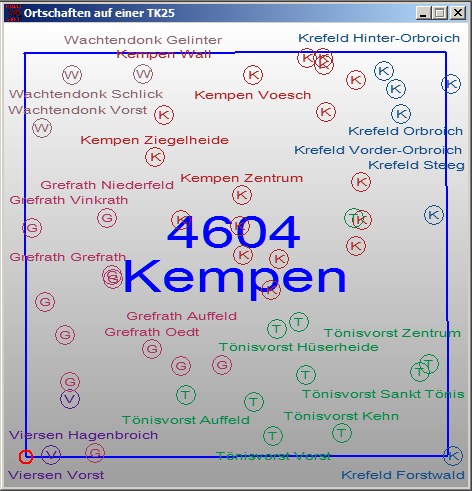
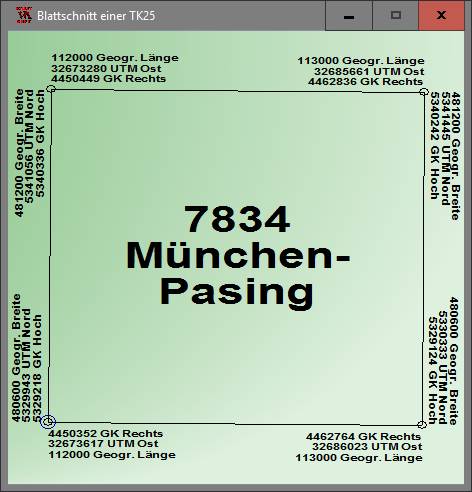
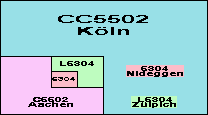
In the context of the planning and execution of economic and scientific projects, topographical documents are often used. The program TOPOWIN provides information of the Official Topographic Map series and the German Basic Map series from the entire national territory in suitable graphic views. It performs various coordinate transformations and researches. The program has been developed with the participation of many Federal State surveying authorities. For the first time in the previous version TOPO (for DOS) and later in TOPOWIN nationwide topographic information has been compiled for data technical evaluation. The program is a useful and versatile tool for engineering offices, planning offices and users of topographic maps.
The topographical maps of different standards, required for a project, can be determined by the complaint of known parameters or by the direct selection from overview graphics and from sorted lists. By the investigation of topographical records on the basis of known places, a data base with more then 125.000 localities and residential districts is available.
The program TOPOWIN calculates with Gauss Krueger coordinates and Geographic Coordinates referring to the Potsdam Datum (Bessel ellipsoid with central point Rauenberg). It also works with UTM coordinates and UTMRef coordinates in the NATO standard, which refer to the datum ETRS89 (GRS80 / WGS84, geocentric). A special feature of the program is the determination of the map sheet corners in UTM / ETRS89 coordinates.
To search for maps and to calculate map parameters, the parameters listed here can be entered directly in the input fields of the program:
For selection from separate windows are available:
After entering a value or the selection from the overview or a list, the program calculates the values listed here and carries out corresponding coordinate transformations:
After entering the following information are available graphically prepared on separate windows. In all views, the current location is entered.
Other possibilities offered by the program:
TOPOWIN is suitable for editing ASCII control files that contain known search criteria (various coordinates, map names or numbers of the TK25, TK50, TK100 or TKÜ200, locations, municipality keys, object descriptions). After selecting the parameters or corner coordinates to be calculated (see list above), these are determined and written to an ASCII output file. This program function is well suited for extensive coordinate transformations and for the determination of map characteristics and corner coordinates. To create the control files and to display the output files, TOPOWIN contains appropriate editors. The input and output files can be created or edited with all text editors and with almost all word processing programs.
TOPOWIN can be run on most common networks. The client installations works automatically. It is possible to use Terminal Services on WINDOWS Servers like e.g. "Citrix Terminal Server".
Because the program TOPOWIN is a quite complex database application, some requirements to the hardware are to be fulfilled for its perfect working. To ensure stable performance it should be installed on a personal computer with the processor class Pentium or higher and at least 32 MB RAM available. The program will run under Microsoft WINDOWS 2000 / XP / NT / Vista / 7 / 8 / 10 and compatible operating systems.
Pricing and ordering information can be found in the Price list.
For available licensing options have a look to the License page.
Order the program with the electronic Order Form.
The free test version of the program with a detailed user manual can be downloaded as ZIP packed file by the Internet.
Managing Director Fred Killet explains why you should never use an illegal version of our geodetic program TOPOWIN.
 In order that you are always well informed about our company, we write actual news, current information and special offers here into this column.
 Geodata Germany
 Read more...
New work sheet
Read the work sheet...
New work sheet
Read the work sheet...
New work sheet
Read the work sheet...
NTv2 collection
Read the Press Release... To the NTv2 collection...
is member of
Read more...
New work sheet
Read the work sheet...
New work sheet
Read the work sheet...
New work sheet
Read the work sheet...
NTv2 collection
Read the Press Release... To the NTv2 collection...
is member of
 Translators wanted!
new languages can be added at any time by creating new language files.
Everybody who is interested can translate a new language file into his native language for himself and all users.
Translators wanted!
new languages can be added at any time by creating new language files.
Everybody who is interested can translate a new language file into his native language for himself and all users.
